

I would not go into details of what is PostgreSQL as I am pretty sure you already know about it. But in this guide, we will install and use PostgreSQL in Arch or Manjaro operating system with PHP including how to manage the databases.
So let’s get started.
Installation
We will install all the necessary packages first including PHP.
sudo pacman -S postgresql php php-pgsqlPHP configuration
To make PHP work with PostgreSQL, we have to enable it in php.ini.
sudo vim /etc/php/php.iniUncomment the following lines (line numbers are given as a guide for you).
extension=pdo_pgsql   (line number 929)
extension=pgsql       (line number 931)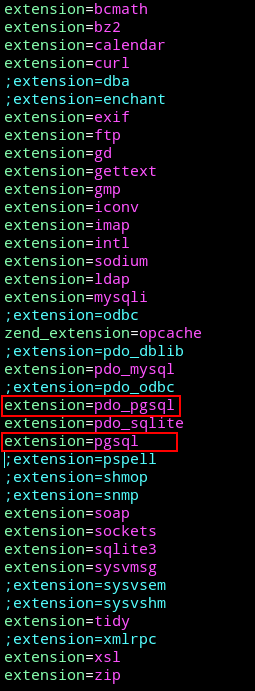
Restart Apache or your installed web server application.
sudo systemctl restart httpdPostgreSQL initial setup
After installation we need to setup the database server so we can use it anywhere we would like to.
sudo systemctl start postgresqlOn initial systemctl startup if you get an error related to initdb: data folder does exist. Login to PostgreSQL as postgres user.
sudo -iu postgresRun the following command.
initdb --locale en_US.UTF-8 -D '/var/lib/postgres/data'

exit
Now try to start it again.
sudo systemctl start postgresql
sudo systemctl enable postgresql
You can also check the PostgreSQL clusters with.
pg_lsclustersCreate users and databases
Login to PostgreSQL space as postgres user.
sudo -iu postgresCreate a user with createuser tool and -P flag to set a password. pguser is the username.
createuser pguser -PCreate a database with createdb tool. my_test_db is the database name.
createdb my_test_dbOnce done, we will assign pguser to my_test_db in psql shell.
psqlRun the following command to grant all the privileges to user pguser on my_test_db database.
GRANT ALL PRIVILEGES ON DATABASE my_test_db TO pguser;This way pguser has access to my_test_db too.
Now if you want that pguser should be able to create databases too (for example using a PHP script or any other tool). Run this command to alter pguser and give permission of creating databases. Quit with \q.
ALTER USER pguser CREATEDB;
\q
Exit if you are done here.
exitAccess from PHP
Now you can access PostgreSQL with your PHP scripts and you already have a database ready for use.
If you want to manipulate PostgreSQL databases/tables from a UI. I would recommend to install Adminer and login to PostgreSQL as pguser which we created earlier.
You will be able to create databases too under this user as we granted it the permission.
Backup databases
To backup PostgreSQL databases, you can use pg_dump tool.
pg_dump -U pguser -W -F p my_test_db > /home/user/my_test_db_dump.sql-U : PostgreSQL user
-W : force to ask for user password
-F : output file format
p : plain text file
-F can have values like, c (custom), d (directory), t (tar), p (plain text)
Check out help page of pg_dump for more options and details.
pg_dump --helpYou can dump all the databases with pg_dumpall.
Restore
To restore a database, use psql tool.
psql -U pguser -W my_test_db < /home/user/my_test_db_dump.sql